Blog
Telegram limits - fixedmember exclusive
Telegram Limits 2026
Exclusive Research by FixedMember — Last Updated April 2026
Why do limitations exist?
Telegram uses limits to ensure Fair Usage Policy and maintain service stability. This comprehensive reference lists every currently known Telegram limit — including exclusive ⭐ Telegram Premium benefits.
⭐ = Telegram Premium enhanced limit. Free users get the base value; Premium subscribers get the upgraded value.
| Username length | 5–32 characters (NFT usernames: 4+) |
| Bio length | 70 chars ⭐ 140 chars |
| First Name | 1–64 characters |
| Last Name | 0–64 characters |
| Self-destruction (inactivity) | 1, 3, 6, 12, 18, 24 months (default: 18) |
| Spam ban duration | 3 days or more |
| Channels/groups joined | 500 ⭐ 1,000 |
| Geochats membership | Up to 5 (incl. owned) |
| Saved GIFs | 200 ⭐ 400 |
| Video-avatar duration | Up to 10 seconds |
| Group/channel creation | Up to 50 per day |
| Accounts per app | 3 ⭐ 4–6 (platform dependent) |
| Max participants | 200,000 (Broadcast: unlimited) |
| Admins in groups | 50 |
| Bots in groups | 20 |
| Pinned chats (main list) | 5 ⭐ 10 |
| Group name & description | 255 characters |
| Message editing | 48h (unlimited for admins/Saved) |
| Photo/video self-destruct | 1–60 seconds |
| Recent actions log | Last 2 days |
| Mentions per message | 50 (no notifications after) |
| Visible messages | 1,000,000 last messages |
| Pinned messages | Unlimited |
| Statistics requirement | 500+ participants |
| Username change reservation | ~15–30 minutes |
| Admin role length | 16 characters |
| Chat title length | 128 characters |
| Convert to broadcast group | 199,000+ members required |
| Read receipts | Groups ≤100 members, valid 7 days |
| Number of topics | 1,000,000 |
| Topic title length | 128 characters |
| Pinned topics | 5 (more with boosts) |
| Audio chat listeners | Unlimited |
| Video broadcasting | Up to 1,000 simultaneous users |
| Stream viewers | Unlimited (~2,000 stable) |
| Voice chat title | 40 characters |
| Scheduled chats | Up to 7 days ahead |
| Public usernames per account | 10 ⭐ 20 |
| @username length | 5–32 characters |
| Channel name & description | 255 characters |
| Channel admins (incl. bots) | 50 |
| Post editing | Unlimited (2-week discussion sync) |
| Channel subscribers | Unlimited |
| Visible subscribers (admin) | 200 people |
| Similar channels shown | 10 ⭐ 100 |
| Channel deletion | 1K+ subs = Telegram support only |
| Preview private channels (200+) | 5 min once per day |
| Inviting users directly | Up to 200 |
| Statistics requirement | 50+ subs & 3 days old |
| Message length | 4,096 characters |
| Media caption | 1,024 chars ⭐ 4,096 chars |
| File size limit | 2 GB ⭐ 4 GB |
| File name length | 60 characters |
| Video message | 1 min, 12 MB, 384px |
| Album items | Up to 10 items |
| Scheduled messages | 100 per chat |
| Schedule range | Up to 365 days |
| Poll options | 2–12 options |
| Daily story limit | 1 story ⭐ 100 stories |
| Story text length | 200 chars ⭐ 2,048 chars |
| Story duration | 24h, 48h, or permanent |
| Stealth mode (hide views) | ⭐ Premium only (every 3h, 30 min) |
| Folders amount | 10 ⭐ 30 |
| Chats per folder | 100 ⭐ 200 |
| Pinned chats per folder | 100 ⭐ 200 |
| Shareable folder links | 15 ⭐ 30 |
| Bots per account | 20 |
| Bot @username | 5–32 characters |
| Bot about text | 120 characters |
| Bot description | 512 characters |
| Upload (no local API) | 50 MB |
| Upload (local API server) | 2,000 MB |
| Download (no local API) | 20 MB |
| Download (local API server) | 800 MB |
| Keyboard buttons | 100 |
| Commands (BotFather) | 0–100 |
| Message rate (group) | 20 msgs/sec per chat |
| Inline results | 50 per page |
| Sticker packs installed | 200 |
| Favorite stickers | 5 ⭐ 10 |
| Stickers per pack | 120 static / 50 animated |
| Custom emojis per pack | 200 |
| Sticker dimensions | 512px (512×512 for animated) |
| Sticker file size | 512 KB static / 64 KB animated |
| Animation FPS | 30 or 60 |
| Global search results | Up to 10 (3 on Android official) |
| Min search query length | 4 characters |
| Public search eligibility | Channels with 100+ subscribers |
| Video avatar | 800×800px, 2 MB, 10 sec |
| Username resolve limit | 200 usernames/day |
| Telegraph article size | 64 KiBNeed to grow beyond these limits? |
FixedMember helps you maximize your Telegram growth within official boundaries.
Browse ServicesHow To keep Telegram Accounts Safe ?
How to Safely Manage Multiple Telegram Accounts in 2026
Professional Setup Guide by FixedMember — Updated April 2026
Why do you need a separate setup?
Telegram has significantly tightened anti-spam measures in 2024–2026. Accounts that share IP addresses, device fingerprints, or exhibit unusual patterns are flagged and restricted. Whether you manage channels for clients or run personal projects, isolating accounts is now essential.
Choose Your Platform
Desktop Emulator (Recommended)
Install LDPlayer or BlueStacks on your PC/Mac. Emulators let you run isolated Android instances with separate IPs per VPN profile — the most secure method for 2026.
Why LDPlayer? Lightest resource usage, best Android 9+ compatibility, supports multi-instance with separate VPN per instance.
Download LDPlayer →Mobile (Alternative)
Use a dedicated second phone with an unofficial Telegram client and VPN. Never use your main phone for multi-account operations.
Tip: Install Bgram and enable the "Turn Off Account" feature so your active personal account is invisible during operations.
VPN Setup & Always-On Configuration
⚠️ Critical Step: You MUST enable "Always On VPN" in your Android/emulator settings. This ensures all traffic routes through the VPN — even during app crashes or reboots. Without this, your real IP leaks and Telegram links your accounts together.
| 📍 VPN Server | Match the country of the SIM card used for sign-up |
| 🔒 Protocol | WireGuard or OpenVPN recommended (avoid free PPTP) |
| ♻️ IP Rotation | Use a static or dedicated IP — avoid rotating IPs |
| 🛡️ Kill Switch | Enable kill switch to block all traffic if VPN drops |
📖 How to enable Always On VPN on Android:
ProtonVPN Guide: Always On VPN ↗For iOS: Settings → VPN → Enable "Connect On Demand" for your VPN profile.
Choose an Unofficial Telegram Client
Unofficial clients provide features like multi-account switching, "ghost mode," and anti-spam tools that the official app lacks. They are based on Telegram's open-source code and are safe to use.
🅱️ Bgram
Best choice for 2026. Features "Turn Off Account" mode, built-in proxy management, and anti-spam detection bypass.
Google Play →➕ Plus Messenger
Reliable alternative with extensive theming and per-chat customization. Supports up to 10 simultaneous accounts.
Google Play →Account Warm-Up Protocol (2026)
New accounts in 2026 are heavily monitored during the first 72 hours. Follow this timeline to avoid restrictions:
| Hour 0–2 | Sign up, set first name (matching SIM country). Do NOT set username, bio, or profile photo yet. |
| Hour 2–6 | Join 2–3 popular public channels. Send a few casual messages to Saved Messages. |
| Hour 6–24 | Set profile photo and bio. Add @username. Join up to 10 more channels. Do NOT create any channels yet. |
| Day 2 (24h+) | Create your first channel. Use a legitimate name. Add description and photo. Post 1–2 initial messages. |
| Day 3+ (48h+) | Begin normal operations. Add members gradually (max 30-50/day initially). Avoid mass invitations for the first week. |
Critical Safety Rules for 2026
Never create channels, change username, or edit profile immediately after signing up — Telegram flags this as bot behavior.
Never use suspicious or clickbait channel names (crypto schemes, gambling, adult). Telegram's 2025 AI moderation flags these instantly.
Never share the same IP address between multiple Telegram accounts. Use one VPN profile per account.
Never mass-invite users or forward the same message to many groups in a short time — this triggers the automated spam ban (3+ days).
Wait 24 hours after sign-up before creating any channel or group.
Join your target channel 1 day before transferring ownership to avoid ghost-join spam flags.
Use nicknames matching the region of your SIM card (e.g., English names for US numbers, Persian for IR numbers).
Enable 2FA (Two-Factor Authentication) on every account to prevent unauthorized access and add legitimacy to your account.
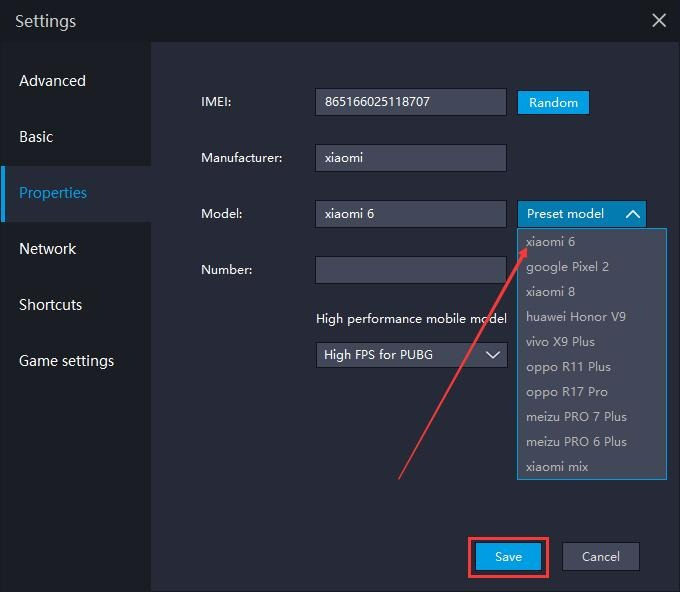
Example: Always On VPN configuration in Android emulator
📋 Quick Reference: Anti-Ban Checklist
| ☐ VPN installed with Always On + Kill Switch enabled |
| ☐ VPN server matches SIM card country |
| ☐ Waited 24h before creating channels |
| ☐ Name matches SIM country language |
| ☐ Profile photo and bio set after 6+ hours |
| ☐ 2FA enabled on all accounts |
| ☐ One IP per account (no shared VPN sessions) |
| ☐ Channel name is legitimate and non-suspicious |
Need professional Telegram growth?
Skip the complexity — let FixedMember handle your channel growth safely and at scale.
Browse Services →